If your business relies on Microsoft Dynamics NAV Server, staying current with platform upgrades is critical to maintaining performance, security, and business continuity.
At Navision India, we help you understand why upgrading Dynamics NAV—especially your Dynamics NAV server environment—has become a priority, particularly to Windows Server 2016 or 2019.
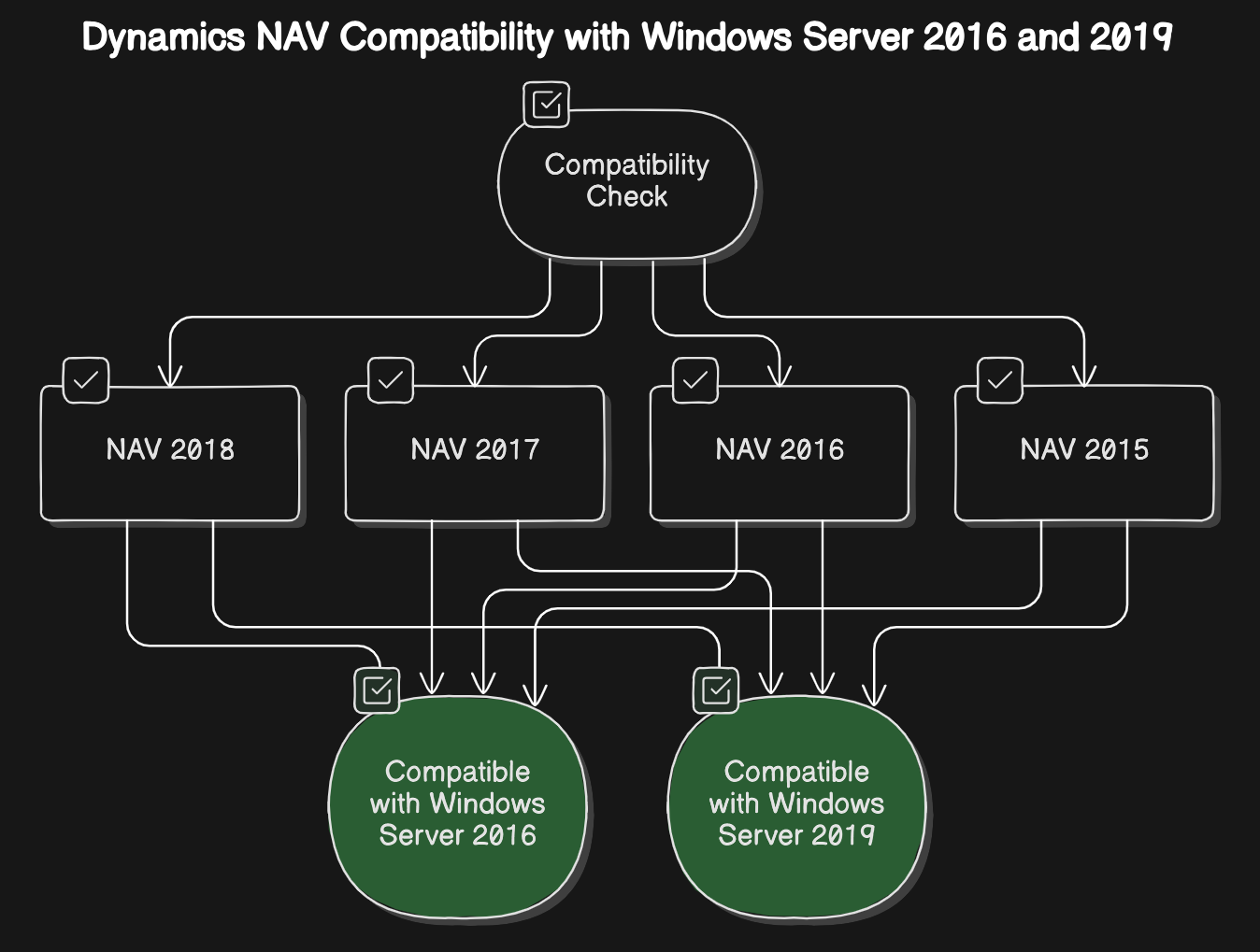
Dynamics NAV versions having compatibility with Windows Server 2016 and 2019 are listed below:-
Microsoft Dynamics NAV 2018
Microsoft Dynamics NAV 2017
Microsoft Dynamics NAV 2016
Microsoft Dynamics NAV 2015
Windows 2019 Server offers a lot of networking improvements like better TCP performance, and with Internet Information Services (IIS) 10.0 also support for the HTTP/2 protocol.
Windows 2019 Server enables you to run shielded virtual machines with intermittent connectivity to the Host Guardian Service by leveraging the new fallback HGS and offline mode features. These capabilities enable you to configure the second set of URLs for Hyper-V to try if it can’t reach your primary HGS server.
Upgrade your Dynamics NAV server to automatically leverage HTTP/2, enhancing network speed and performance, provided your operating system supports this advanced protocol.
Windows 2019 Server with HTTP/2 offers faster and safer web. The improved coalescing of connections will help in delivering an uninterrupted and properly encrypted browsing experience.
TCP configuration improved to cubic to offer more throughput. This TCP improvement provides network performance improvements for virtual workloads and persistent Memory support for Hyper-V virtual machines.
SQL Server in combination with Windows Server 2016 or Windows 10 Client introduces non-volatile memory support for the tail of the log file (LDF) which can significantly increase transaction throughput.
SDN offers many features that increase customer confidence in running workloads, either on-premises or as a service provider in the cloud. Virtual network encrypts communication within virtual machines.
Windows Server 2019 also utilizes Datagram Transport Layer Security (DTLS) on the virtual subnet to encrypt packets ensuring better security.
The Critical Need to Upgrade Dynamics NAV
Microsoft has officially ended mainstream support for many older versions of Dynamics NAV, meaning no more feature updates or fixes, and limited security patches. Sticking with outdated NAV versions exposes your business to risks like:
Decreased performance and reliability due to unsupported server environments.
Security vulnerabilities without the latest operating system protections.
Compatibility challenges as other essential software and hardware evolve.
Increased maintenance costs and operational risks with legacy systems becoming harder to support.
Upgrading Dynamics NAV to run on modern infrastructure like Windows Server 2016 or 2019 ensures your system benefits from stable, secure, and more efficient operations tailored for modern business demands.
Advantages of Upgrading Dynamics NAV Server to Windows Server 2016 or 2019
At Navision India, we strongly recommend upgrading your Dynamics NAV server platform to Windows Server 2016 or 2019 because:
Improved Network Performance: Windows Server 2019 supports the HTTP/2 protocol via IIS 10.0, enhancing communication speed and security for web-based Dynamics NAV deployment.
Enhanced Security: Features such as virtual network encryption, Datagram Transport Layer Security (DTLS), and shielded virtual machines protect your business data from unauthorized access and cyber threats.
Better TCP/IP Throughput: TCP optimizations in Windows Server 2019 improve networking throughput, especially important for virtualized environments and persistent memory support.
Modern Infrastructure Support: Support for non-volatile memory with SQL Server and fallback mechanisms enhance database performance and system resilience.
Future-Proofing Your IT Environment: Using supported server OS versions ensures compatibility with upcoming Microsoft releases and ongoing vendor support.
Upgrading to these Windows Server versions maximizes the benefits of Dynamics NAV’s capabilities with faster, safer, and more reliable system performance.
How Navision India Supports Your Upgrade Dynamics NAV Journey
Upgrading critical ERP infrastructure can be complex. Navision India offers comprehensive expertise to:
Assess your current Dynamics NAV and IT environment’s readiness.
Plan a smooth migration to Windows Server 2016 or 2019 with minimal downtime.
Configure and optimize Dynamics NAV server settings to leverage new platform features.
Provide ongoing support and training to your IT teams post-upgrade.
Our proven upgrade strategies reduce risks, drive operational improvements, and allow your business to focus on growth with confidence.
Don’t Delay Your Upgrade Dynamics NAV Effort
Every day on an outdated Dynamics NAV platform increases risks—from security breaches to slowed business processes. Modernize your ERP foundation by upgrading Dynamics NAV to Windows Server 2016/2019 with Navision India’s trusted expertise and experience.